
Every automated machine needs something to run the sequence, read the I/O, command the axes and talk to the operator and the factory. The three families of hardware that do it, PLCs, motion controllers and industrial PCs, overlap more every year: a CODESYS controller is both a PLC and a motion controller, and a PC with a real-time runtime is both. This guide compares the architectures so you can choose on engineering grounds. For step-by-step selection of a controller once you know the architecture, see how to select a motion controller or PLC.
PLC vs motion controller vs industrial PC compared
| PLC | Motion controller / motion PLC | Industrial PC (IPC) | |
|---|---|---|---|
| Built for | Logic, sequencing, I/O, process control | Generating and synchronising multi-axis trajectories | Combining control with computing: HMI, vision, data, custom code |
| Typical motion | Pulse outputs or a few fieldbus axes; point-to-point | 8–32+ synchronised fieldbus axes, gearing, cams, interpolation | Scales with CPU cores and runtime licence |
| Real-time basis | Dedicated firmware | Dedicated firmware, often on CODESYS | Real-time runtime alongside Windows or Linux |
| Programming | IEC 61131-3 | IEC 61131-3 plus PLCopen motion blocks | IEC 61131-3, PLCopen, plus C/C++, Python and others depending on runtime |
| Hardware | Fanless, DIN-rail, rugged | As PLC; often compact and DIN-rail | Panel, box or cabinet PC; varies from fanless DIN-rail to rack |
| Strengths | Robust, simple to support, familiar to maintenance staff | Motion performance per cost; axis tiers to match machine | One platform for everything; computing headroom |
| Weak points | Limited axes and computing | Less suited to heavy computation, vision or databases | OS updates, security patching, storage, hardware lifecycle |
When a PLC is the right controller
Choose a PLC when the machine is mostly logic: conveyors, valves, pumps, interlocks and a handful of simple axes. A compact PLC with pulse-train outputs can drive a few stepper or servo axes directly, and drive-resident indexing can handle more: the drive stores move tables, and the PLC just selects one and starts it.
The PLC’s advantages are robustness and supportability. It is programmed in the IEC 61131-3 languages that maintenance staff already read. IEC 61131-3 began as IEC 1131 in 1990 to unify what had been manufacturer-dependent PLC programming, and its standardisation makes programs more reusable between systems (Lenze).
The limit is coordination. Each pulse axis needs its own output channel, speed is capped by pulse frequency, and diagnostics stop at a fault input. If axes must move together, follow a master or interpolate a path, move up.
When you need a motion controller
A motion controller, or a motion-capable PLC, generates trajectories for every axis and sends setpoints over a real-time fieldbus every cycle, typically EtherCAT with the drives in cyclic synchronous position mode. It handles electronic gearing and cams, flying shears, gantry pairs and coordinated paths, with full drive diagnostics over the network.
PLCopen gives this a common language. Its motion specification defines an axis state machine and a basic set of function blocks such as MC_MoveAbsolute, with Part 4 for coordinated multi-axis motion in axis groups and Part 5 for homing. Its stated aim is reusable application libraries across hardware platforms: an axis reference hides the drive interface so the same code runs on centralised, distributed or networked architectures (PLCopen).
Sizing in short: count axes including options and future variants, choose an axis tier with headroom, and check the controller’s rated axis count at the cycle time your fastest axis needs, not at its best case. EtherCAT’s design target is cycle times of 100 µs or less with distributed-clock jitter well under 1 µs (ETG), but most machine axes run comfortably at 1 to 2 ms. See EtherCAT vs PROFINET vs EtherNet/IP.
When an industrial PC makes sense
An industrial PC runs a real-time control runtime on the same hardware as a general-purpose operating system. It earns its place when the machine needs significant computing alongside control:
- Machine vision and image processing on the same CPU as the motion
- Large HMIs, recipe databases, traceability and data logging
- Custom algorithms in C/C++, or integration with robotics or AI software
- Very high axis counts, where the runtime scales with CPU cores
How real time coexists with the OS: in Beckhoff’s TwinCAT 3, CPU cores can be used exclusively by the real-time system or shared with Windows, TwinCAT/BSD or Beckhoff RT Linux. Isolating cores gives the real-time program more computing time and less jitter; on shared cores, TwinCAT hands time back to the operating system at the latest after 90% of the set cycle time (Beckhoff). Motion can be spread across several cores and synchronised between them, with axes on one core running at different cycle times, for example 1 ms for delta-picker axes and 4 ms for conveyor width adjustment (Computer & Automation).
What you take on: operating system updates and cyber-security patching, storage that can wear, more heat in the cabinet and a hardware lifecycle tied to PC components. Plan an image-backup and update policy before the first machine ships.
Programming, portability and skills
All three platforms can be programmed in IEC 61131-3 Structured Text, Ladder Diagram, Function Block Diagram and Sequential Function Chart, and many vendors also support Instruction List and CFC. If you standardise on a CODESYS-based runtime and PLCopen motion blocks, much of your application can move between a compact motion controller and a PC runtime.
The bigger skills question is who will maintain the machine. A plant’s electricians may support Ladder on a PLC readily but not a C++ module on an IPC.
Safety, connectivity and HMI
- Safety: none of the three replaces a safety controller or safety relay. Safety functions run in certified hardware, either a separate safety PLC or a safety module on the network such as FSoE on EtherCAT. Keep STO wiring and safety logic independent of the main controller’s software.
- Connectivity: OPC UA and MQTT gateways can be added to any platform. A small gateway is often simpler than turning the controller into a data server.
- HMI: a separate touch panel keeps the controller simple; an IPC with an integrated display combines them. See how to select an HMI and remote I/O.
Worked example: a vision-guided pick-and-place cell
Machine: a cell that picks randomly oriented parts from a conveyor with a 4-axis gantry (X, Y, Z and rotation), synchronised to a conveyor axis, with a camera locating each part. Throughput target 60 picks a minute. 120 I/O points. Two further servo axes for a tray indexer. Customer wants production data over OPC UA.
Axis count: 4 gantry + 1 conveyor + 2 indexer = 7 axes. Plan for 8 with an option, so a 16-axis tier gives room.
Cycle time: one pick per second, with the gantry tracking the moving conveyor. A 1 ms CSP cycle is ample; 500 µs gives margin if move times shrink.
Option A: PLC + vision system. A PLC with pulse outputs cannot synchronise four axes to a moving conveyor cleanly. Ruled out.
Option B: motion controller + smart camera. A CODESYS EtherCAT motion controller runs the 7 axes, conveyor tracking and the sequence. A smart camera or vision PC sends part position over Ethernet each cycle. OPC UA comes from the controller or a gateway. Two boxes, clear responsibilities, simple maintenance.
Option C: industrial PC. One IPC runs the real-time motion runtime on isolated cores and the vision software on others, with OPC UA and the HMI on the same machine. Fewer boxes and lower latency between vision and motion, but OS management and a PC lifecycle to support.
Decision: for a single cell with standard vision tools, option B is usually the lower-risk choice. If the vision algorithm is custom, compute-heavy or needs tight coupling to motion, or the OEM builds many cells and wants one platform, option C pays back. Either way, keep the safety system separate.
Checklist
Send these to our engineers, or use the spec builder:
- Number of axes, including future options, and which must be coordinated
- Motion functions: point-to-point, gearing, cams, interpolation, conveyor tracking
- Cycle time for the fastest axis
- I/O count and type, local and remote
- Computing needs: vision, data logging, databases, custom code
- HMI size and location; remote access
- Fieldbus to drives and network to the plant (PROFINET, EtherNet/IP, OPC UA, MQTT)
- Safety functions and the safety controller or relay used
- Programming languages and skills of the people who will maintain it
- Environment: cabinet temperature, vibration, fanless requirement
- Lifecycle: expected machine life, spares policy, update and security policy
Products in our range to consider
Our supply network covers PLCs, motion controllers, HMIs and I/O; we do not list industrial PCs.
- Leadshine MC500 motion controllers: CODESYS V3.5 PLC and motion controller with EtherCAT for 8, 16 or 32 axes plus 6 local pulse axes, OPC UA and EtherNet/IP among its interfaces.
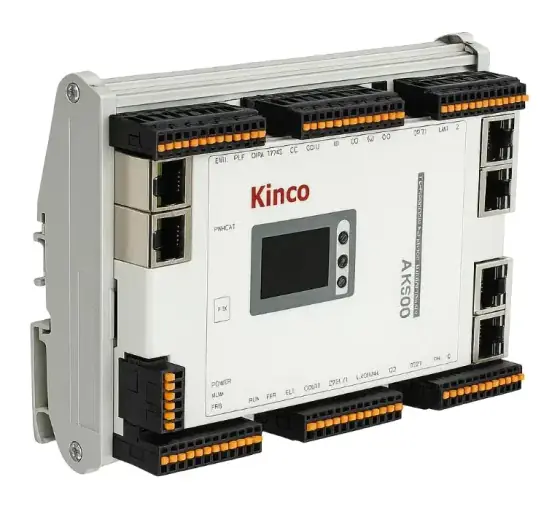
- Kinco AK motion controller: 54 mm wide CODESYS EtherCAT controller for up to 32 synchronised axes on a 1 ms cycle, with RP20 I/O expansion.
- Kinco K6S compact PLC: compact modular PLC with tool-free slice I/O expansion.
- Kinco MK HMI/PLC: 4.3” or 7” touchscreen with a built-in CODESYS PLC and up to three 50 kHz pulse outputs, for small machines with a few simple axes.
- Kinco RP20 remote I/O: slim remote I/O with an EtherCAT coupler, up to 16 modules and 256 points.
- Kinco GW01 IoT gateway: dual-Ethernet gateway supporting more than 300 industrial protocols, pushing machine data to the cloud over MQTT.
- Kinco FUTURE HMI: quad-core panels up to 15.6” Full HD with dual Ethernet and metal housings.
Related guides
- How to select a motion controller or PLC
- EtherCAT vs PROFINET vs EtherNet/IP
- How servo drives work and servo drive form factors explained
- Our motion controllers overview
Frequently asked questions
What is the difference between a PLC, a motion controller and an industrial PC?
A PLC is a dedicated, rugged controller for logic, sequencing and I/O, programmed in IEC 61131-3 languages. A motion controller is optimised to generate and synchronise trajectories for many axes over a real-time fieldbus. An industrial PC is a ruggedised computer running a real-time control runtime alongside a general operating system, so it can combine PLC, motion, HMI, vision and custom software on one CPU.
Can a PLC do motion control?
Yes, to a point. Compact PLCs with pulse outputs can drive a few stepper or servo axes, and many modern PLCs run PLCopen motion function blocks over EtherCAT or another fieldbus. Once you need many tightly synchronised axes, electronic cams, or interpolated paths at short cycle times, choose a controller rated for that axis count and cycle, whether it is called a motion controller or a motion PLC.
Is an industrial PC deterministic enough for motion control?
It can be, with a real-time runtime. Beckhoff's TwinCAT, for example, runs real-time tasks on cores that can be isolated from Windows or Linux, which gives more computing time and less jitter. Determinism then depends on the runtime, the Ethernet port used for EtherCAT, and keeping the general operating system from starving the real-time cores.
What is IEC 61131-3?
It is the international standard for PLC programming languages, started in 1990 as IEC 1131. Lenze lists its five languages as Instruction List, Ladder Diagram, Function Block language, Sequential Function Chart and Structured Text. Standardisation makes programs more reusable between systems; CODESYS-based PLCs, motion controllers and PC runtimes all follow it, so the same skills transfer.
What are PLCopen motion function blocks?
They are a standard set of IEC 61131-3 function blocks for motion, such as MC_MoveAbsolute, with a defined axis state machine. PLCopen's aim is application libraries reusable across hardware: an axis reference hides the drive interface, so the same code can run on centralised, distributed or networked architectures. Part 4 covers coordinated multi-axis motion and Part 5 homing.
Should I choose an industrial PC to future-proof a machine?
Only if you will use what it adds. An IPC gives computing headroom for vision, data and custom code, but brings operating system updates, cyber-security patching, storage wear and shorter hardware lifecycles to manage. If the machine needs logic and coordinated motion, a motion controller with spare axes and a gateway for data is often simpler and cheaper to support.
Sources
- PLCopen: Motion control overview
- Lenze: IEC 61131-3 programming languages
- Beckhoff Information System: TwinCAT 3 real-time
- Computer & Automation: Consistent multi-core and multitask support (TwinCAT MC3)
- EtherCAT Technology Group: EtherCAT technology overview
Figures are summarised from the sources above and from manufacturers' published data on the date shown. Always confirm against the current datasheet for your exact part.