
In short:Count the axes and decide how tightly they must be coordinated. One to three independent axes can run from drive-resident indexing or a PLC with pulse outputs; synchronised multi-axis motion, electronic cams and interpolation need a motion controller or motion-capable PLC that masters a real-time fieldbus such as EtherCAT, with spare axis capacity, a cycle time to suit your fastest axis and the I/O, HMI and connectivity the machine needs.
The controller is the machine’s brain: it runs the sequence, generates or commands every axis’s motion, reads the I/O and talks to the operator and the factory. Choosing one is less about raw CPU speed than about matching architecture to the motion your machine actually needs. Work through the decisions below in order.
Step 1: Decide where the motion intelligence lives
There are three common architectures:
| Architecture | How it works | Best for |
|---|---|---|
| Drive-resident indexing | The drive stores position tables or a short program; a PLC or I/O triggers moves | One to a few independent point-to-point axes |
| PLC with pulse outputs | The PLC generates step/direction pulses to stepper or servo drives | Two to four simple axes, low cost, little coordination |
| Motion controller or motion PLC over a fieldbus | The controller computes all trajectories and sends setpoints every cycle over EtherCAT or similar | Synchronised axes, cams, gearing, interpolation, more than a handful of axes |
Drive-resident indexing is underrated. Many stepper and servo drives store a set of moves, often 16, selected by digital inputs or Modbus. That keeps the PLC simple and suits feeders, adjusters and format-change axes.
Pulse output PLCs are cheap and familiar, but each axis needs a pulse channel, top speed is limited by the pulse frequency, and diagnostics stop at “alarm on or off”.
Fieldbus motion control gives you one cable for all axes, full drive diagnostics and parameter access, and true synchronisation. It is the default for any machine where axes must move together.
Step 2: Count axes and add headroom
List every axis, including ones the first machine might not have: format-change axes, a second gantry motor, an optional labeller. Controllers are sold in axis tiers (8, 16, 32 and so on) and often licensed per axis.
Rules of thumb:
- Add at least 25% headroom over the axes you have today. A machine family nearly always grows.
- Separate coordinated axes (which must run in the controller’s motion task) from independent axes (which could index on their own drive and free capacity).
- Count virtual axes too. A virtual master axis for a line shaft or cam usually takes a slot.
Step 3: Set the cycle time
In cyclic synchronous position mode (CSP), the controller sends a new position setpoint to each drive every cycle, and the drive closes current, velocity and position loops much faster in between. The EtherCAT Technology Group designs for cycle times of 100 µs or less, with distributed clocks that synchronise devices to well under 1 µs (EtherCAT Technology Group). Achievable cycle time in practice depends on the controller CPU and the number of axes.
As a rule of thumb:
- 2 ms: conveyors, simple pick-and-place, most indexing machines.
- 1 ms: typical packaging and assembly machines with gearing and cams.
- 250–500 µs: high-speed coupled axes such as flying shears, rotary knives, gantries with two motors on one axis, or very high dynamic pick-and-place.
Ask for the controller’s axis count at your cycle time. A controller rated for 32 axes at 1 ms may handle far fewer at 250 µs.
Step 4: Choose the programming environment
IEC 61131-3 is the standard for PLC programming languages. Its 2025 edition defines Structured Text, Ladder Diagram and Function Block Diagram, plus Sequential Function Chart for structuring programs (SNV). Earlier editions also defined Instruction List, and the languages can be mixed in one project (Lenze). Structured Text suits motion maths and state machines; ladder suits maintenance staff who fault-find on site.
CODESYS is a widely used IEC 61131-3 environment that runs on controllers from many manufacturers. Its SoftMotion option adds certified PLCopen function blocks, a graphical cam editor and drivers for EtherCAT and CANopen drives (CODESYS). Choosing a CODESYS controller makes your code more portable between hardware vendors and widens the pool of engineers who can support it.
PLCopen motion control standardises the motion function blocks themselves (PLCopen):
- Part 1 and 2: single-axis moves (MC_MoveAbsolute, MC_Halt, MC_TouchProbe) and multi-axis master-slave functions such as gearing (MC_GearIn) and camming (MC_CamIn).
- Part 4: coordinated motion of axis groups in Cartesian space, with linear, circular and path moves and kinematic transformations.
- Part 5: homing procedures.
Check which parts a controller actually supports. Single-axis and gearing are near-universal; Part 4 interpolation and robot kinematics are not.
Step 5: Check the motion functions you need
- Electronic gearing: a slave follows a master at a fixed ratio. Line shafts, film feed, conveyors.
- Electronic cams: a slave follows a non-linear profile against a master. Cross-seal jaws, rotary knives, cut-to-length.
- Interpolation: two or more axes follow a path together. Gluing, dispensing, cutting, XY gantries.
- Kinematics: SCARA, delta or articulated robot transforms.
- Registration and touch probe: latching position on a sensor edge in the drive, at hardware speed, rather than in the controller’s scan.
- Gantry or dual-drive axes: two motors on one mechanical axis, kept in step.
Step 6: Plan I/O, HMI and networks
- I/O count and location. Count digital, analogue and temperature points. Remote I/O on the same EtherCAT network cuts cabinet wiring and lets you put I/O islands near the machine sections they serve.
- HMI. A separate touch panel suits larger machines; an all-in-one HMI with a built-in PLC suits small machines with a few pulse axes and keeps cost and wiring down.
- Other fieldbuses. Check for the ports you need beyond motion: Modbus TCP or RTU for third-party devices, CANopen for legacy drives, EtherNet/IP or PROFINET if the machine must slot into a customer’s line.
- Safety. Decide whether safety runs on a separate safety relay or PLC, or over the network (FSoE, PROFIsafe), and whether the controller supports it.
Step 7: Connectivity and IIoT
Machine builders increasingly need remote diagnostics, data logging and software updates. Two protocols dominate. OPC UA offers a structured information model and built-in security for machine-to-system communication; MQTT is a lightweight publish-subscribe protocol through a broker, efficient for sending data to cloud systems. They are often used together (ISA).
You can build this into the controller, if it supports OPC UA or MQTT natively, or add an IoT gateway that reads the controller and pushes data out. A gateway keeps internet-facing traffic off the motion controller, which suits sites with strict network segregation. Agree remote-access security with the end user’s IT team early.
Worked example: a flow-wrapping machine
Machine: horizontal flow wrapper. Axes: infeed conveyor, film feed, fin-seal rollers, rotary cross-seal jaws, a film registration correction axis, plus three format-change axes and a printer index axis. That is nine axes, plus one virtual master. About 60 digital inputs, 40 outputs, 6 analogue and 8 temperature channels for seal heaters. Customer wants a 10-inch HMI and remote diagnostics.
Architecture: the film feed, fin-seal and infeed must be geared to the virtual master, and the cross-seal jaws must follow an electronic cam so they match film speed through the seal. That rules out pulse outputs and drive-resident indexing for the main axes. It needs an EtherCAT motion controller with camming.
Axis count: 9 real + 1 virtual = 10. With 25% headroom, 12 to 13. The three format-change axes could index on their own drives over Modbus, but putting them on EtherCAT keeps one network and full diagnostics. Choose a 16-axis tier.
Cycle time: at a film speed of 0.5 m/s, a 1 ms cycle moves the film 0.5 mm between setpoints. The drives interpolate between those, so 1 ms is adequate for the cam. Registration is a different matter: if the print mark were read by a controller input scanned once per 1 ms cycle, position uncertainty would be up to 0.5 mm. Latch the mark with a touch probe input on the film-feed drive instead, which captures position at hardware speed, and correct the film over the next cycles.
I/O: 114 points. Onboard I/O plus EtherCAT remote I/O islands at the infeed, jaw and discharge sections, with thermocouple modules for the heaters.
Connectivity: OPC UA from the controller to the customer’s line system, and an IoT gateway pushing alarms and run data over MQTT for remote support.
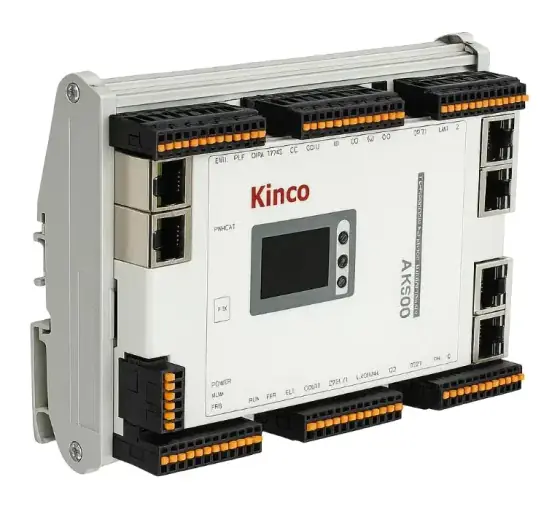
Candidates: a Leadshine MC500 in its 16-axis MC516CS form, or a Kinco AK controller with Kinco RP20 remote I/O; a Kinco GREEN HMI; and a Kinco GW01 gateway for remote access.
Products in our range to consider
- Kinco AK (AK8 / AK840): slim 54 mm CODESYS EtherCAT motion controller running up to 32 synchronised axes on a 1 ms cycle.
- Leadshine MC500: CODESYS-based PLC and motion controller for 8, 16 or 32 EtherCAT axes plus six local 200 kHz pulse axes, with OPC UA, EtherNet/IP and CANopen ports.
- Kinco K6S: compact modular PLC with tool-free slice I/O expansion.
- Kinco MK: 4.3 or 7 inch touchscreen with built-in CODESYS PLC and up to three 50 kHz pulse outputs, for small machines.
- Kinco RP20: slim remote and expansion I/O on EtherCAT, up to 16 modules and 256 points, including RTD and thermocouple modules.
- Kinco GREEN HMI family: touch panels up to 17 inches, with Wi-Fi and 4G variants for connected machines.
- Kinco GW01: IoT gateway with dual Ethernet and optional Wi-Fi or 4G, over 300 industrial protocols, pushing data via MQTT.
- The M-IoT remote monitoring platform: cloud platform and app for remote monitoring, data recording and updates of connected HMIs, PLCs and servo systems.
- Leadshine EM2RS: stepper drive with a 16-segment position table over Modbus RTU, for drive-resident indexing without a motion controller.
- Novanta Liberty MDrive: integrated stepper with an optional onboard programmable controller, for distributed axes that run their own sequences.
What else the build needs
- Drives on the same fieldbus, supporting the operating modes you use (CSP, CSV, CST, profile position). See servo drives, how to select a servo drive and how to select a stepper drive.
- Motors and feedback. See servo and stepper motors and encoders.
- Remote I/O and sensor interfaces near the machine sections.
- HMI and, if needed, a separate safety controller or safety relay.
- Network cabling rated for the environment and, for rotating sections, an Ethernet-capable slip ring. See Ethernet through slip rings.
- 24 V DC control power with separate supplies or fusing for logic and outputs.
- Gateway or firewall for remote access.
Things that catch engineers out
- Buying exactly the axis count you need today, then needing a new controller tier for the first option.
- Reading axis capacity at the best-case cycle time rather than at the cycle you will run.
- Latching registration marks in the controller scan instead of the drive’s touch probe input.
- Assuming “EtherCAT drive” means compatible. Check the drive’s ESI file imports, and that it supports the operating modes and PDO mapping the controller expects.
- Pulse outputs that cannot reach top speed at the microstep or encoder resolution you have set.
- No plan for software ownership: who holds the source, the licences and the CODESYS version for the machine’s life.
- Remote access added late, without the end user’s IT approval.
Checklist
Send these to our engineers, or enter them in the spec builder:
- Number of axes now and planned, and which must be synchronised
- Motion functions: gearing, cams, interpolation, kinematics, registration
- Fastest axis speed and resolution, and the cycle time you think you need
- Existing drives or fieldbus standards on site (EtherCAT, PROFINET, EtherNet/IP, CANopen)
- Digital, analogue and temperature I/O count, and where on the machine it sits
- HMI size and whether an all-in-one HMI/PLC would do
- Programming preference: CODESYS, specific IEC 61131-3 languages
- Safety concept and required SIL or PL
- Connectivity: OPC UA, MQTT, remote access, data logging
- Environment, cabinet space, volume and cost target
Frequently asked questions
What is the difference between a PLC and a motion controller?
A PLC is built for logic, sequencing and I/O, with motion added through pulse outputs or function blocks. A motion controller is built to generate and synchronise trajectories for many axes over a real-time network, with gearing, cams and interpolation. The line has blurred: many CODESYS-based controllers are both, running IEC 61131-3 logic and PLCopen motion blocks on one CPU.
Do I need a motion controller for one or two axes?
Often not. A drive with a built-in position table or programmable indexer can run point-to-point moves triggered by I/O or Modbus, and a compact PLC with pulse outputs can handle a few simple axes. You need a motion controller when axes must move in a coordinated way, follow a master, run cams, or when you need more axes than the PLC's pulse outputs allow.
What cycle time does an EtherCAT motion controller need?
For most machine axes in cyclic synchronous position mode, 1 to 2 ms is enough, because the drive interpolates between setpoints and closes its own fast loops. Highly dynamic or tightly coupled axes, such as flying shears, gantry pairs or high-speed pick-and-place, may need 250 to 500 µs. Check the controller's rated axis count at your cycle time, not at its best case.
What is IEC 61131-3?
It is the international standard for PLC programming languages. The 2025 edition defines Structured Text, Ladder Diagram and Function Block Diagram, plus Sequential Function Chart for structuring programs; earlier editions also included Instruction List, which many tools still support. Controllers programmed in CODESYS follow it, and PLCopen motion blocks build on it, so motion code is more portable between vendors.
What are PLCopen motion control function blocks?
They are a standard set of function blocks, such as MC_Power, MC_MoveAbsolute, MC_GearIn and MC_CamIn, with a defined axis state machine. Part 1 covers single-axis moves and master-slave gearing and camming; Part 4 covers coordinated motion of axis groups with linear, circular and path moves. Using them reduces hardware dependence and retraining when you change controller.
OPC UA or MQTT for connecting a machine to IIoT systems?
They solve different problems and are often combined. OPC UA offers a rich information model and built-in security for machine-to-system communication. MQTT is a lightweight publish-subscribe protocol through a broker, efficient for sending data to the cloud. Choose a controller or gateway that supports what your factory systems or customers already use.
Sources
- SNV: IEC 61131-3:2025 Programmable controllers, Part 3: Programming languages (edition 4)
- Lenze: IEC 61131-3 programming languages
- PLCopen: Motion control overview
- CODESYS: SoftMotion
- EtherCAT Technology Group: EtherCAT technology overview
- ISA Interchange: OPC Unified Architecture and MQTT
Figures are summarised from the sources above and from manufacturers' published data on the date shown. Always confirm against the current datasheet for your exact part.